
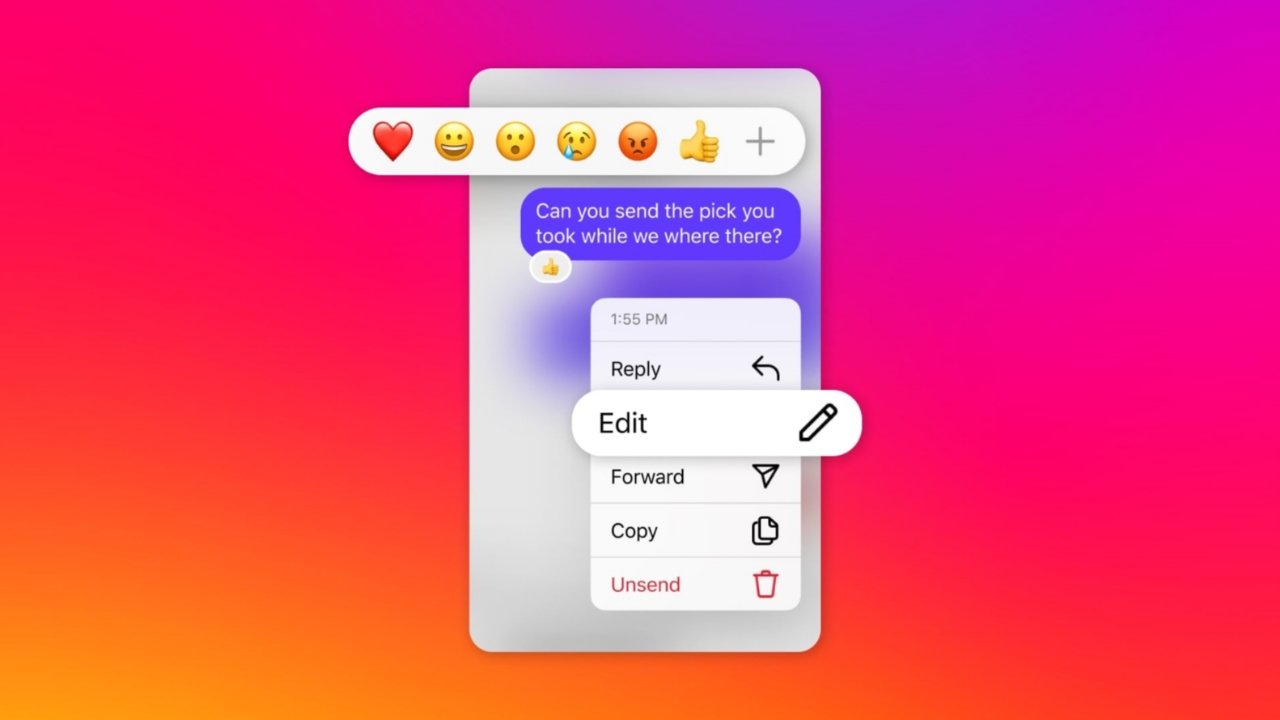

Instagram allows users to change message reactions quickly anytime. Users can replace the default heart reaction completely. They can also customize popup reaction emojis easily.
Instagram additionally supports animated reactions and message effects. These features improve conversations and make chats enjoyable daily.
Change Double Tap Reaction on Instagram DMs Step-by-Step
Instagram uses the heart emoji reaction by default. Double-tapping any message sends the heart emoji immediately. Many users prefer different emojis for quick conversations online.
Instagram thankfully supports changing default reactions very easily. Follow these detailed steps carefully below today.
Open Instagram Direct Messages Properly
Launch the Instagram application on your smartphone first. Go to the Instagram home page normally afterward. Swipe left from the home screen carefully.
Users can also tap the messenger icon directly. Your Instagram direct message inbox opens immediately afterward.
Open Any Conversation Thread
Choose any conversation from your message inbox list. Open the conversation where reaction customization is needed.
Users can customize reactions inside every conversation separately. This process works similarly across Android and iPhone devices.
Long-Press Any Existing Message
Find any message inside the selected conversation thread. Press and hold the message for a few seconds.
A popup reaction panel appears above the message afterward. This popup contains six quick reaction emojis initially.
Tap The Plus Icon Carefully
Look carefully at the popup reaction menu now. Tap the plus icon from the emoji panel.
Instagram now opens the complete emoji selection screen..Users can access many different emojis from this section.
Open The Customize Reaction Option
Find the Customize option beside the “Your Reactions” section. Tap this option for editing current emoji reactions quickly.
Instagram now allows changing every quick reaction emoji easily. Users can completely personalize the popup reaction menu now.
Select The New Default Emoji
Choose any emoji from the top emoji panel carefully. The selected emoji becomes the new default reaction instantly.
Many users prefer laughing or fire reaction emojis. Some users choose clapping or smiling emojis instead.
Save All Emoji Reaction Changes
Tap the checkmark or tick icon above carefully afterward. Instagram saves every selected emoji customization immediately afterward.
Double-tapping messages now sends your selected emoji instantly.
The Features
Instagram offers many useful reaction customization features additionally. These features improve chats and create enjoyable conversations online.
Users can express feelings quickly without typing full replies. Below are important Instagram reaction features explained clearly.
Customize Every Popup Reaction Emoji
Instagram allows changing every popup reaction emoji separately. Users are not limited to default reaction emojis anymore. This feature helps users access favorite emojis much faster.
Customized reactions improve daily messaging convenience greatly.
Use The Complete Emoji Library
Instagram supports reactions using the full emoji library. Users can choose almost any available emoji anytime easily. Tap the plus icon for accessing additional emojis quickly.
This feature improves emotional expression during conversations significantly.
Remove Sent Emoji Reactions Quickly
Sometimes users accidentally react during fast online conversations. Instagram thankfully supports removing reactions very easily afterward.
Double-tap the same message again carefully afterward. The previously sent reaction disappears immediately afterward completely.
Send Animated Emoji Burst Reactions
Instagram supports full-screen animated emoji burst reactions beautifully. Long-press any emoji from the popup reaction panel carefully.
The selected emoji covers the entire conversation screen afterward. Recipients also see these animated reactions while opening conversations.
However, recipients cannot replay these animations later again.
Instagram DMs Message Effects
Instagram additionally offers special message effects for conversations. These effects make chats entertaining and visually attractive daily.
Users can apply effects before sending direct messages easily..Currently, Instagram provides four interesting message effects.
Hearts Message Effect
The Hearts effect creates floating heart animations beautifully. This effect works perfectly during romantic or emotional conversations.
Many users apply this effect during personal chats. The animation makes messages appear more expressive and warm.
Gift Box Message Effect
The Gift Box effect hides messages inside animated boxes. Recipients must open boxes before reading messages completely afterward.
This effect creates excitement during fun conversations online daily.
Flames Message Effect
The Flames effect surrounds messages using animated fire effects. Users commonly apply this effect during exciting conversations online.
The animation gives messages energetic and dramatic appearance instantly. Many younger users prefer this exciting visual effect regularly.
Confetti Message Effect
The Confetti effect creates celebration animations inside conversations beautifully. This effect works perfectly during birthdays and achievements online.
The colorful animation improves happy conversations significantly afterward.
How To Use Instagram Message Effects
Open Instagram direct messages on your smartphone first. Type your message inside the reply box carefully. Tap the magnifying glass icon beside the reply section.
Choose any effect from the top effects row afterward. Send the message after selecting preferred visual effects carefully.
Helpful Tips
Many Instagram users miss useful messaging features daily online. These helpful tips improve your messaging experience significantly afterward.
Keep Instagram Updated Regularly
Older Instagram versions may lack emoji reaction support completely. Always update Instagram from official application stores regularly.
Updated applications provide the latest messaging features and improvements consistently.
Clear Instagram Cache On Android Phones
Sometimes customization features stop working unexpectedly on Android devices. Users should clear Instagram cache and application data quickly.
Open smartphone settings and locate installed applications section. Select Instagram and clear cache from storage settings afterward.
Reinstall Instagram If Problems Continue
Some users still experience customization problems after updates regularly. Reinstalling Instagram usually fixes these technical issues quickly.
Delete Instagram completely from your smartphone device first. Install Instagram again afterward using official application stores safely.
Customize Reactions For Faster Messaging
Customized reactions improve conversation speed during busy schedules greatly. Users can respond quickly without typing complete replies.
This feature saves valuable time during regular conversations daily.
Frequently Asked Questions
Can Users Change Double-Tap Reactions For Posts?
Sadly, Instagram currently does not support this customization feature. Posts and reels still use heart reactions by default.
Users cannot replace reactions for posts currently anywhere.
How Can Users React Using Emojis?
Long-press any Instagram message inside conversation threads carefully first. Choose any reaction emoji from the popup panel afterward.
Double-tapping messages sends the default emoji instantly afterward.
Why Are Emoji Reactions Missing Sometimes?
Usually outdated Instagram versions cause emoji reaction problems regularly. Updating Instagram fixes these issues for most users quickly.
Reinstalling applications may also solve remaining problems completely afterward.
Can Users Hide Instagram Likes Publicly?
Yes, Instagram supports hiding likes and share counts easily. Open Instagram settings and select “Like and share counts.”
Enable the hide-like toggle switch afterward carefully.
Can Followers See Instagram Likes Normally?
Yes, Instagram likes remain publicly visible for followers normally. Followers can view liked posts while visiting profiles online.
Privacy settings may limit visibility for some accounts additionally.
The Bottom Corner
Users can replace Double Tap Reaction on Instagram DMs using favorite emojis easily. Animated emoji bursts improve conversations and create entertaining experiences.
Special message effects additionally make chats visually attractive daily. Always update Instagram for smooth performance and latest features.
Nice app